Mercury Is Moving You from Choice Financial Group to Column N.A. — Here’s the Whole Thing, Step by Step
If you run a foreign-owned US LLC on Mercury, you’ve probably gotten an “action required” email about a partner-bank change. Nothing is wrong with your account. Here’s what’s happening, why, and exactly how to get through the re-verification — with real screenshots and the parts that actually trip up non-US founders.
Updated June 2026 · ~20 min read · The complete end-to-end guide — verification and account transfer — for non-resident single-member LLC owners
⏳ There’s a real deadline — but it’s per-account
The short version
- This is a mandatory but routine partner-bank migration. Your Mercury login, dashboard, and most integrations stay the same.
- You’ll re-do KYC (identity + business verification) before Mercury opens your new Column N.A. account. The old and new accounts run in parallel during the switch, which is designed to keep your accounts accessible while you move over.
- The single hardest step for foreign owners is address verification with a non-English document. There’s a clean way through it.
- Set US citizenship status = Non-Resident and enter your foreign home address as your personal address. Get these right the first time.
- Migrating your bank does not change your IRS obligations. A foreign-owned single-member LLC generally files Form 5472 + pro forma 1120 for a year with a reportable related-party transaction.
What’s actually happening (and why you shouldn’t panic)
First, the thing nobody explains clearly: Mercury is not a bank. Mercury is a financial-technology company — the slick app, the dashboard, the cards. The actual money sits at one or more real, FDIC-insured partner banks behind the scenes. For the last few years Mercury has spread customer deposits across several partner banks, and two of the big ones were Choice Financial Group and Column N.A.
What the email is telling you is simple: the bank holding your deposits is changing from Choice to Column. Mercury’s stated reason is a change to Choice’s program guidelines. The bigger picture is that Mercury has been consolidating which partner banks it leans on — and in April 2026 it received conditional approval from the OCC to stand up its own national bank, “Mercury Bank, N.A.” Tightening up the partner-bank lineup is part of that journey.
A little history — why this is good news, not bad
So who is Column N.A.?
Column is a nationally chartered, Member-FDIC bankbased in San Francisco, founded in 2022 by alumni of Plaid, Square, Goldman Sachs and J.P. Morgan. It’s an “API bank” — built from the ground up as developer-first infrastructure that fintechs like Mercury build on top of. In plain terms: it’s a real bank, it’s regulated, it’s well-engineered, and it’s specifically good at the things foreign founders care about, like accepting incoming wires in non-USD currencies and faster payments. Your deposits stay with FDIC-insured partner banks throughout — subject to those banks’ program terms and the standard deposit-insurance limits and rules.
What this means in practice
- Your deposits are held at FDIC-insured partner banks — Choice today, Column after the switch — subject to each program’s terms and the applicable deposit-insurance limits and rules.
- Your old and new accounts run side by side during the transition, which is designed to let you keep receiving wires and paying bills while you migrate.
- Your Mercury login, app, and dashboard don’t change. Mercury is still your point of contact.
What changes, what stays the same
Likely changes
- Your account & routing numbers (Column issues new ones)
- You re-confirm KYC — identity, ownership, business details
- You re-accept account agreements (now Column’s)
- You’ll update connected services (Stripe, PayPal, ACH payors) with the new numbers later
Stays the same
- Your Mercury login & password
- The app, dashboard & UX
- Account access while both sets run in parallel
- Deposits at FDIC-insured partner banks (subject to program terms)
- Mercury as your support contact
Banking basics for foreign founders
This migration throws a lot of banking vocabulary at you — checking, savings, routing numbers, ACH, wires, sweep. If US business banking is new to you, here’s a 3-minute primer so the rest of the guide (and your Mercury dashboard) makes sense. If you already know this, skip ahead to Part 1.
Checking vs. savings account
🟦 Checking account
Your day-to-day operating account. Money that moves constantly: customer payments come in, you pay vendors, contractors, subscriptions, and your own draws go out. It comes with a debit card and is built for frequent transactions. Most of your activity lives here.
🟩 Savings account
A parking spot for cash you don’t need right now — tax reserves, a profit buffer, retained earnings. It usually earns more interest than checking and is meant for money that sits still. On Mercury, moving money between your checking and savings is instant and free.
A simple rule of thumb
Routing number vs. account number
Every US bank account is identified by two numbers. Anyone paying you needs both:
| Number | What it identifies |
|---|---|
| Routing number | The bank (9 digits). Identifies which US bank holds the account — here, Column N.A. |
| Account number | Your specific account at that bank. Treat it like a password — only share it with people who pay you. |
This is exactly why the migration matters: when your account moves from Choice to Column, both numbers change, so everyone who sends you money needs the new pair (Part 2 walks you through notifying them).
ACH vs. wire — the two ways money moves
- ACH — the cheap, slow rail (often free, 1–3 business days). Used for most US payouts and recurring payments. “ACH pull” means a vendor is allowed to debit your account automatically (e.g., a subscription).
- Wire — the fast, pricier rail (a flat fee, often same-day). Used for large or international transfers. This is usually how money reaches you from abroad — and where Column’s ability to accept non-USD wires helps.
Where Mercury fits — fintech, not a bank
Before you start: have these ready
The migration is mostly a re-verification. You’ll move faster if you have these open in another tab before you click “Get started.”
- Passport — valid and unexpired (you may need to re-upload the photo page)
- EIN confirmation — your CP 575 or 147C letter (need a refresher? see the EIN & formation guide)
- Articles of Organization — your LLC’s formation document
- Proof of your home address — ideally an English-language bank/credit-card statement, utility bill, or lease from the last 90 days (this is the document that trips people up — more below)
- Your registered-agent / US legal address — exactly as it appears on your state filing
- A revenue document — a Stripe/PayPal/Shopify payout summary or an invoice, if your account is funded by revenue
Part 1 — Verify your business, step by step
The email that starts it all
It begins with an email from Mercury to the address on your account. It is easy to mistake for marketing and ignore — don’t. This is a required notice. It explains that your company currently banks with Choice Financial Group and that your account needs to move to Column N.A. by a stated deadline, and it lists two perks Mercury says you’ll gain: lower FX rates on incoming wires and real-time payments.
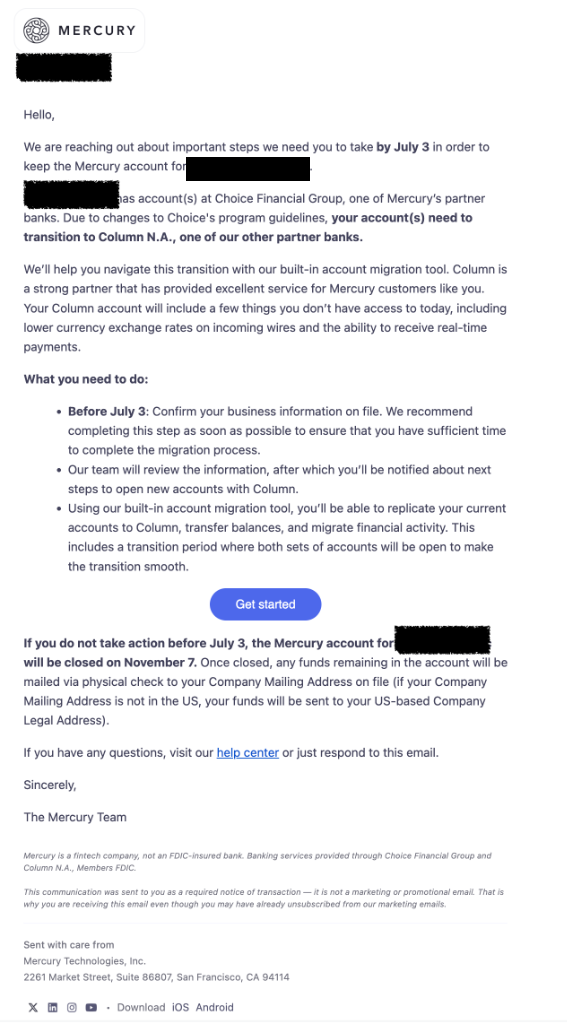
What the email actually asks of you:
- Confirm your business info before the deadline.
- Mercury reviews it and tells you the next steps to open the Column account.
- You use the built-in migration tool to replicate accounts and move balances. Both account sets stay open during the transition.
Foreign owners: watch the check-mailing clause
Click the purple Get started button, or just go to mercury.com and log in.
Log in to Mercury
Head to mercury.com and sign in. Nothing unusual here — email and password, with a passkey option (Face ID / fingerprint / security key) if you’ve set one up.
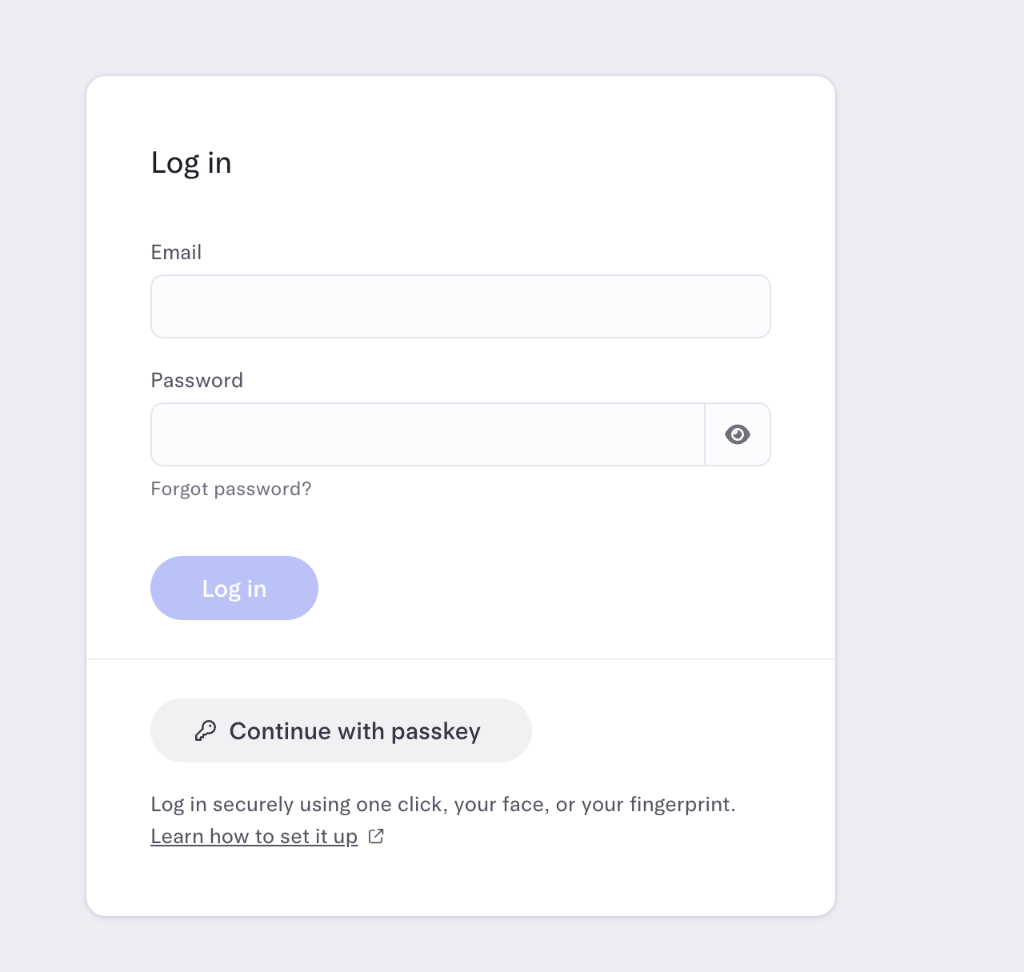
💡 Worth doing: turn on a passkey
Acknowledge the migration notice
The moment you land on the dashboard, an Action requiredmodal appears over everything: “Your Mercury partner bank is changing.” You can’t make it disappear without ticking the acknowledgment box — Mercury wants to be certain you’ve seen it.
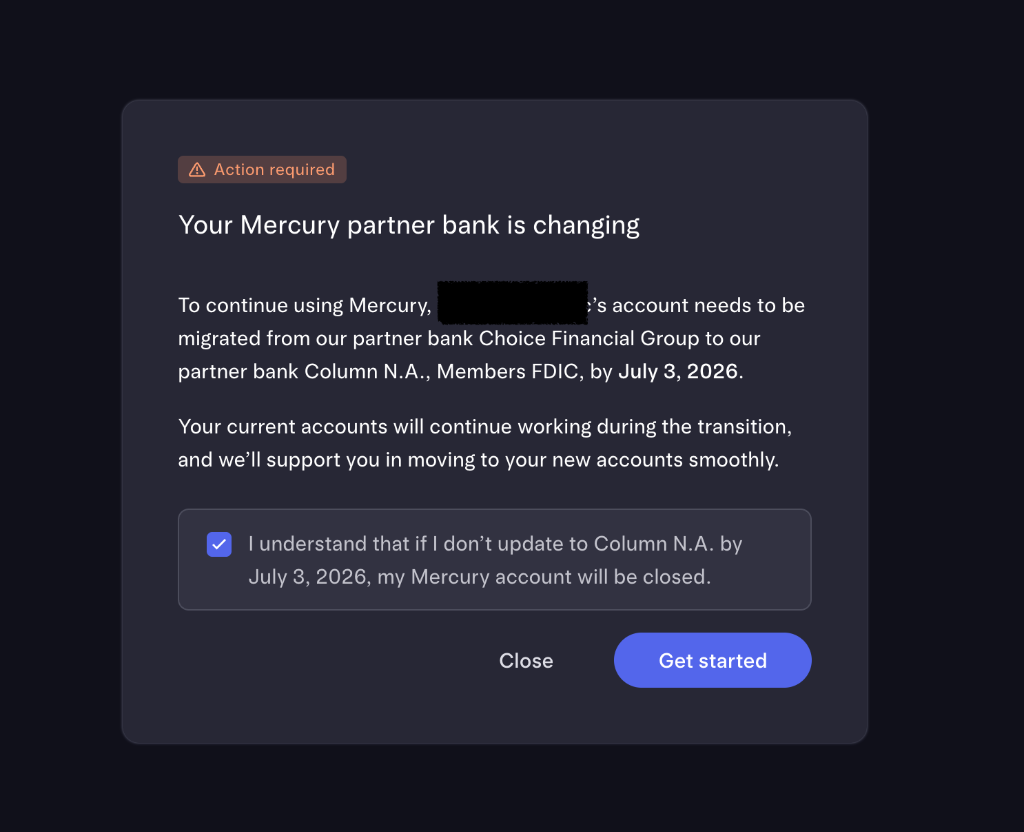
Read it, check the box (“I understand that if I don’t update to Column N.A. by the deadline, my Mercury account will be closed”), and click Get started. You can click Close to come back later, but the clock is running.
In Mercury’s own words
Review and accept Column N.A.’s four agreements
This is the most document-heavy screen. You’ll review four legal agreements for Column, each expandable with a dropdown arrow, each marked with a green check once you’ve opened it.
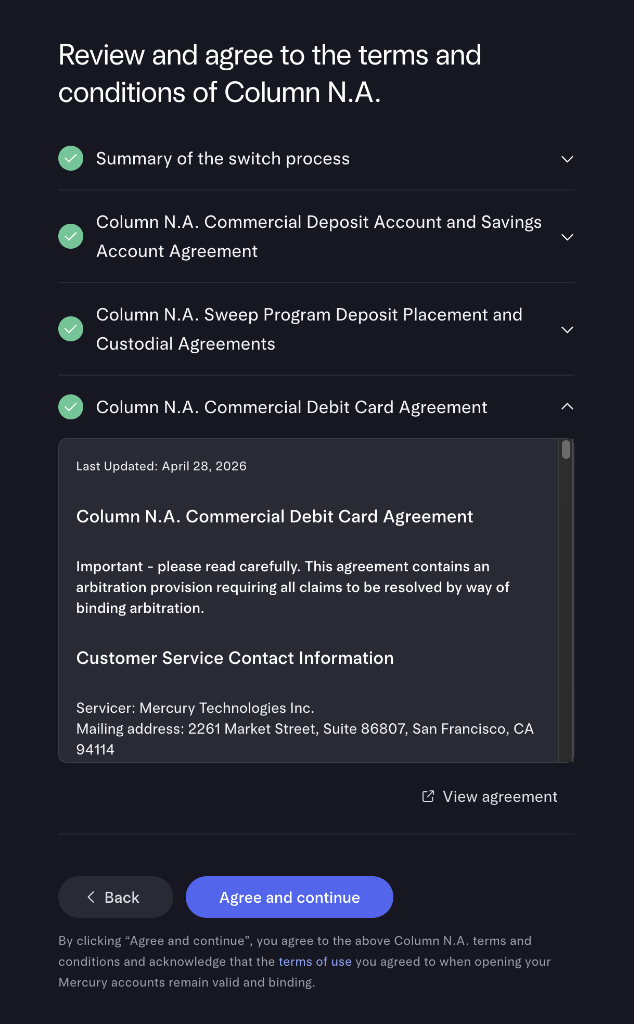
- Summary of the switch process — what changes and what doesn’t
- Commercial Deposit & Savings Account Agreement — your core accounts
- Sweep Program & Custodial Agreements — how excess balances can be spread across institutions to extend FDIC coverage, subject to the program’s terms
- Commercial Debit Card Agreement — your Mercury card under Column
Read the arbitration clause before you click
A useful detail for the nervous: the agreements confirm your servicer is still Mercury Technologies Inc., and that deposit insurance continues through Column’s FDIC-insured program, subject to its terms. Open all four, then click Agree and continue.
Start the company-info review
Mercury now asks you to confirm your company information before it opens the new account. This is the KYC gate. Click Start review when you have your documents ready.
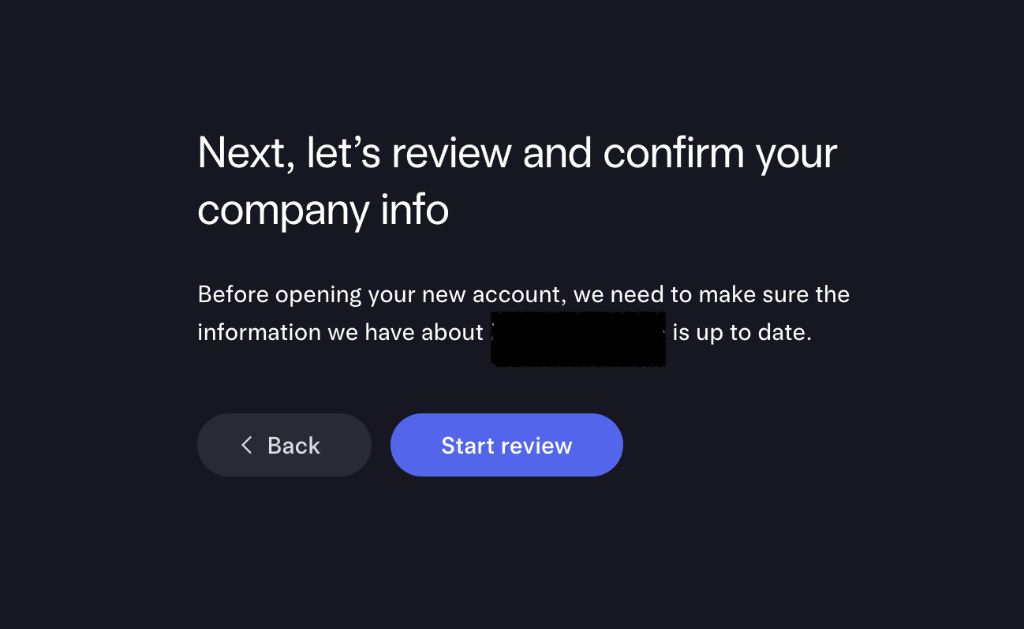
The overview: three sections, your choice of order
You’ll see Update company info broken into three sections, all due by the deadline. You can do them in any order. There’s a Snooze for 7 days button, but don’t lean on it — Mercury still needs time to review after you submit.
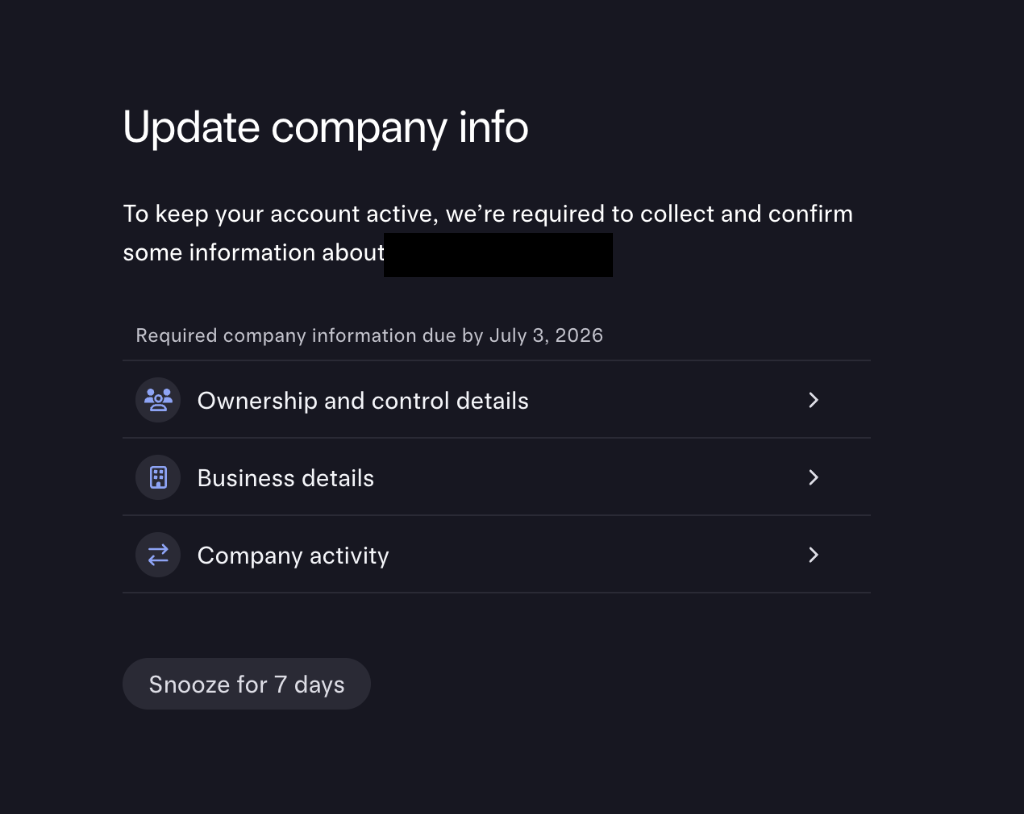
- 👥 Ownership and control details — you, your passport, ownership %, residency
- 🏢 Business details — legal name, EIN, state, addresses
- 🔄 Company activity — what you do, volumes, funding sources
Start with Ownership and control details — it’s the most important one for foreign owners.
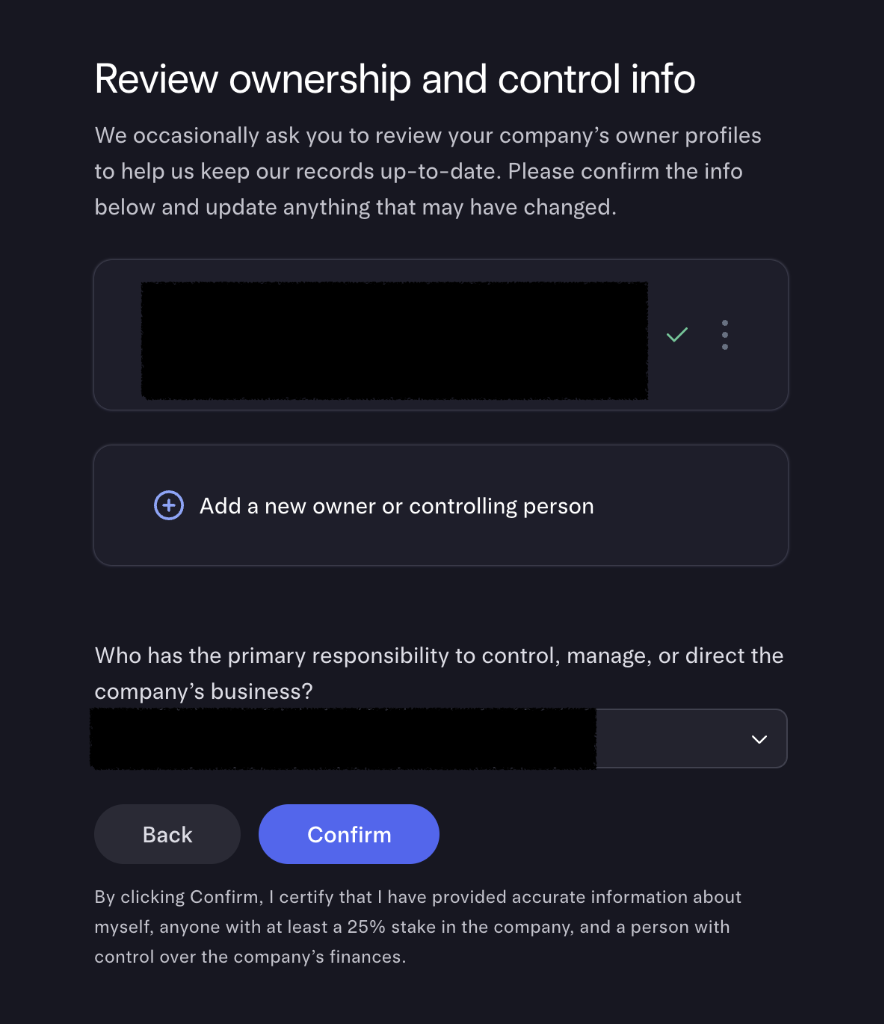
Ownership — your personal profile
Mercury shows your existing owner profile and asks you to confirm it. Most fields are self-explanatory, but two deserve your full attention.
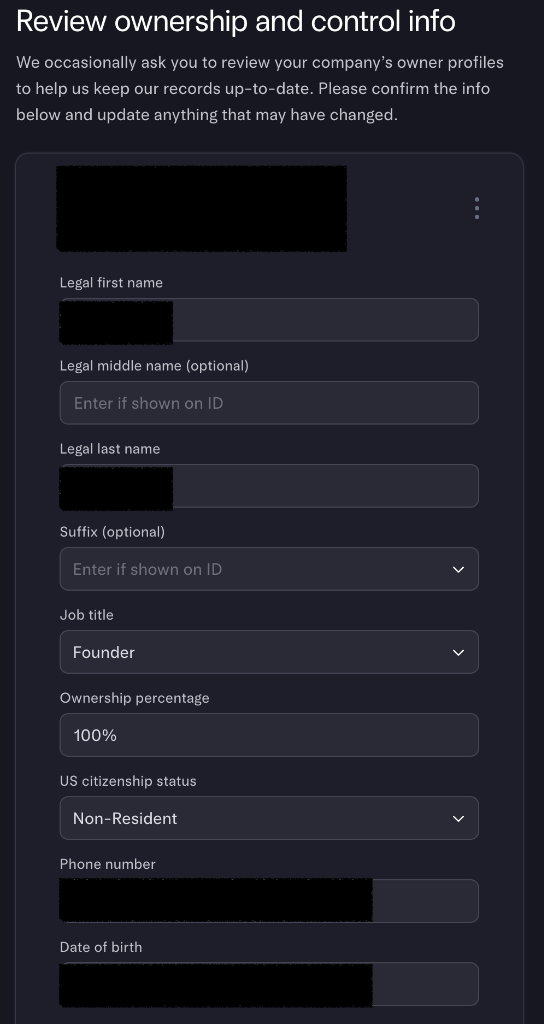
🚩 The field foreign owners must get right: US citizenship status
Ownership — address, ID upload, and the legal certification
Scroll down on the same profile to your residential address, your uploaded ID, and the controlling-person confirmation.
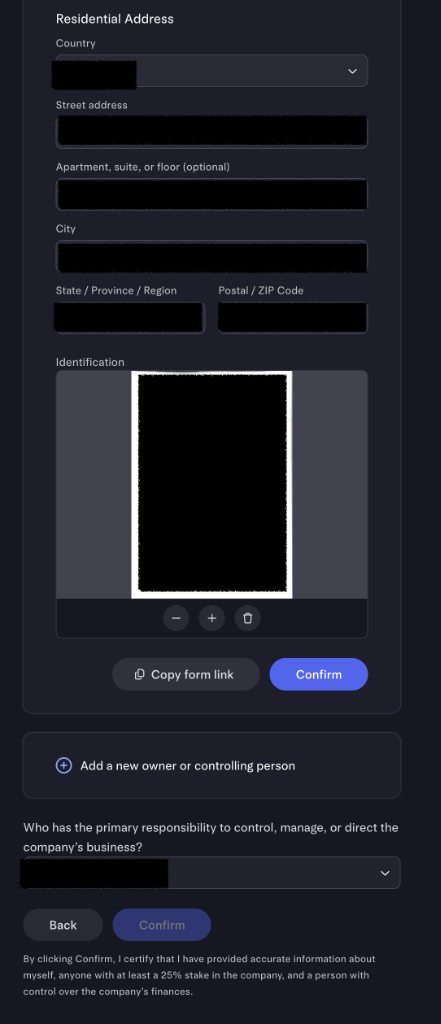
This is YOUR home address — not your US business address
For a single-member LLC you can skip “Add a new owner or controlling person,” then select yourself as the person with primary control. The fine print is a real legal certification — by clicking Confirm you certify the information is accurate, so double-check name spelling (must match your passport), 100% ownership, and Non-Resident status before you submit.
Address verification — the step that stops most foreign owners
Now Mercury wants a document proving your residential address. It runs an automated check that compares the name and address on your document against your profile. When you live abroad, this is where things get interesting.
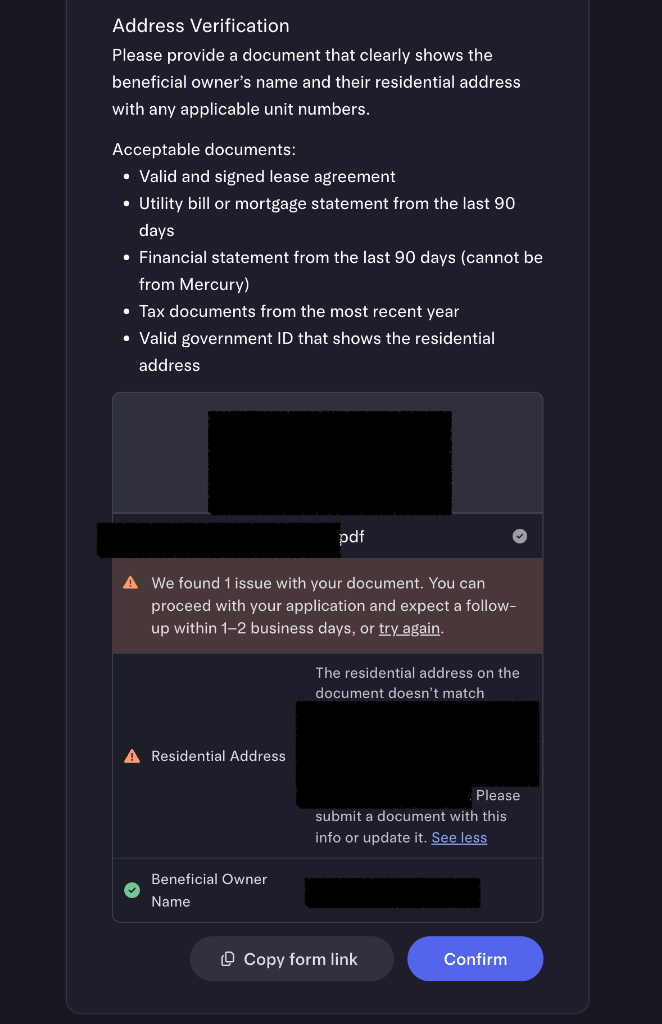
See the why behind this in the next section — it’s the single most useful thing in this guide, so it gets its own write-up below. The short version: if the auto-check passes, great; if it flags a mismatch, you can usually proceed anyway into a short human review.
A clean pass looks like this:
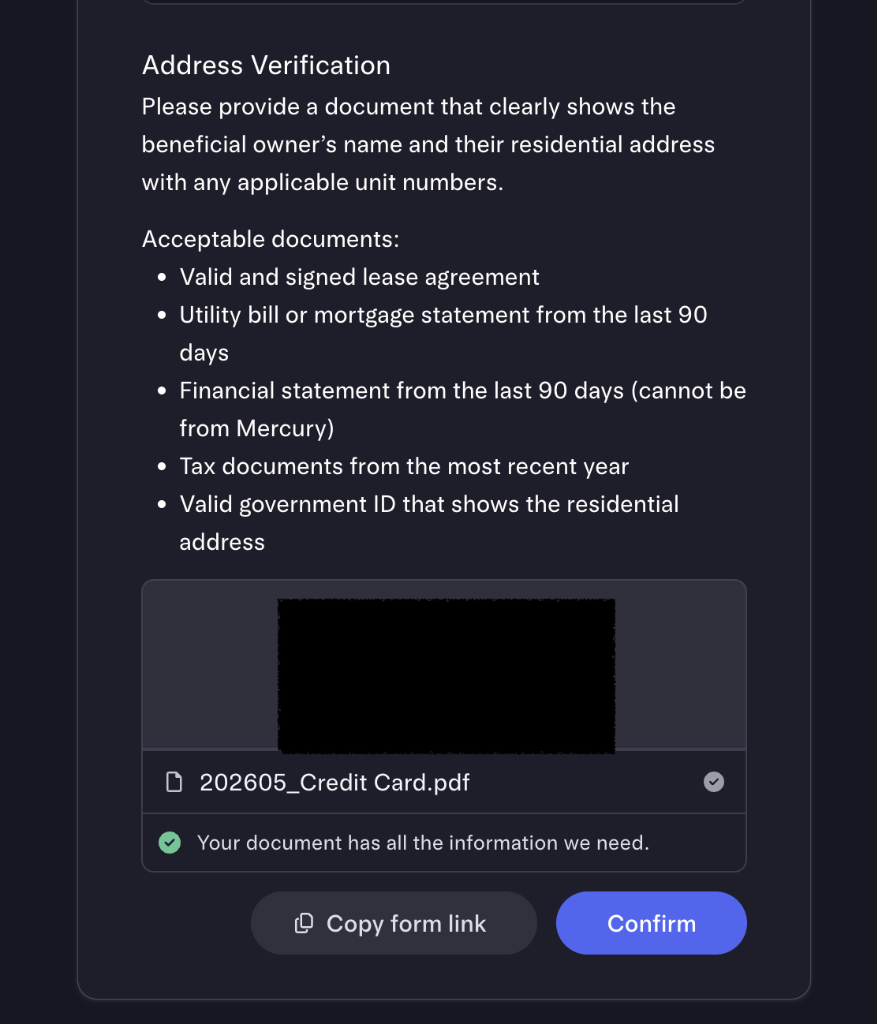
Ownership confirmed
Once verification clears (instantly or after the short review), you’re back on the ownership summary with a green check on your profile. Confirm you’re set as the primary controlling person and click Confirm.
Business details — your company on file
Back on the overview, open Business details. Mercury shows your existing company record — legal name, DBA, EIN, company type, description, formation document and date, industry — and asks if it’s still accurate.
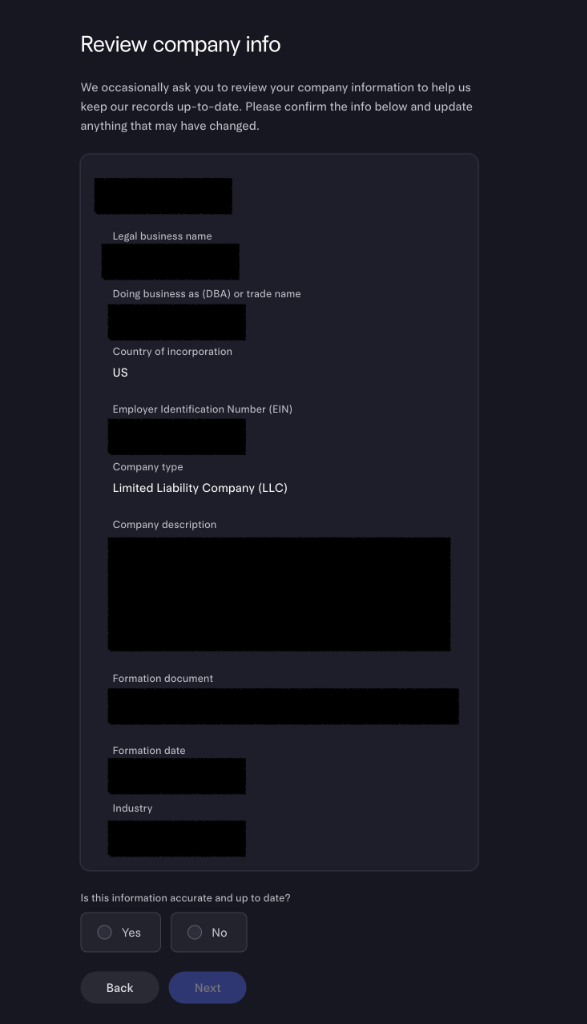
Country of incorporation is US — even though you aren’t
Company legal address — the US one
Next Mercury asks for your company’s legal address. This is not your home address abroad — it’s the US address on your Articles of Organization, which for most foreign owners is their registered agent’s address.
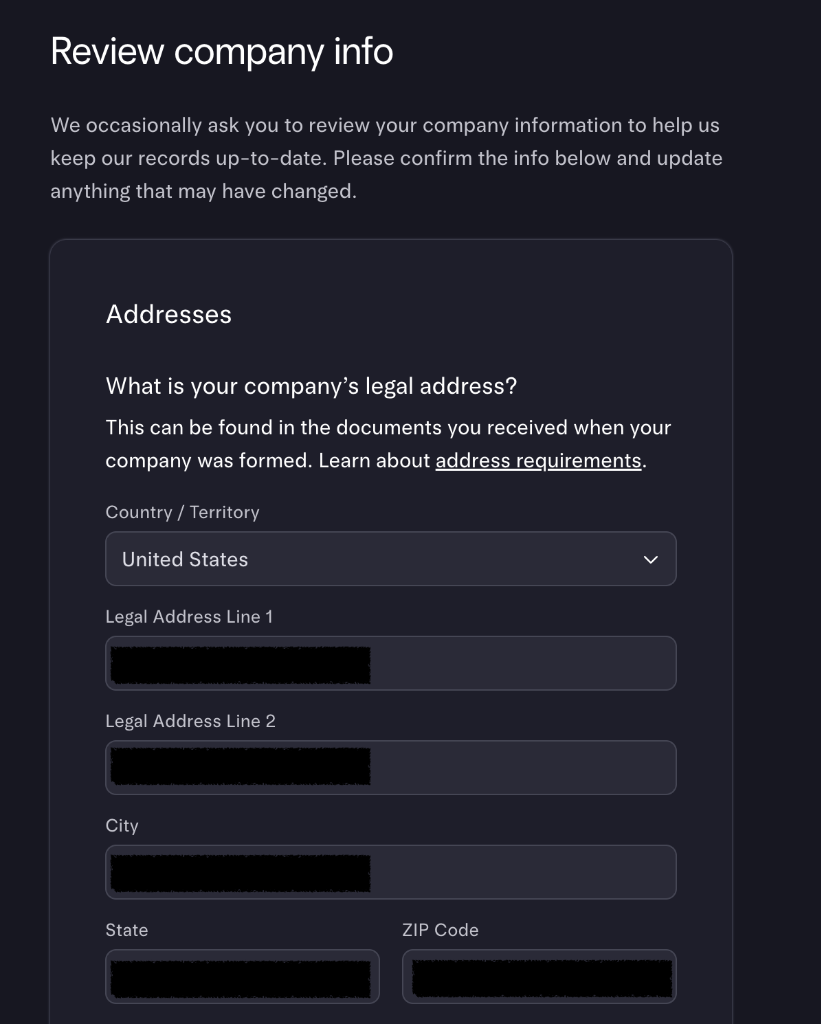
The golden rule
Company physical address — where you actually work
Then Mercury asks for your company’s physical address— “the office or residential address where you do most of your work.” This is a different question, and for foreign owners the honest answer is usually a foreign address: your home office, co-working space, wherever you actually sit.
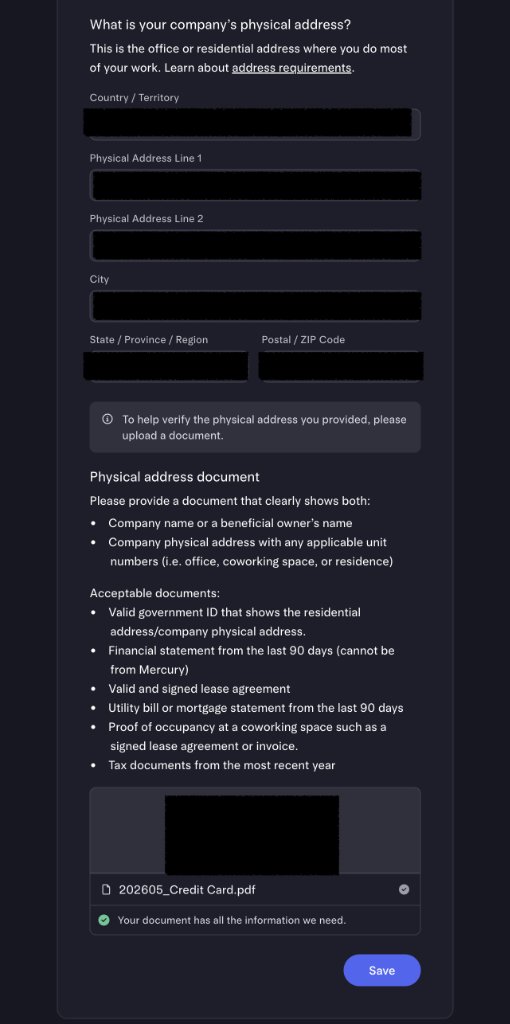
Be truthful — and don’t reuse the wrong address
Put the real place you do your daily work, even if it’s overseas.
- ❌ Not your registered-agent address (that was the previous step)
- ❌ Not a PO box, virtual mailbox, or a made-up US address
- ✅ Your actual home office / co-working / office address — foreign is fine
You’ll upload a document to verify it. The same non-English rules from Step 9 apply — try an English document first; if you don’t have one, submit anyway and let it go to human review.
Company activity — and the honesty trap
The Company activity section asks for your website, the countries you operate in and move money to/from, your average balance, your monthly volume, why you need a US bank, and how the account is funded (Revenue / Self / Investors). If you choose Revenue, you’ll upload a payout summary or invoice.
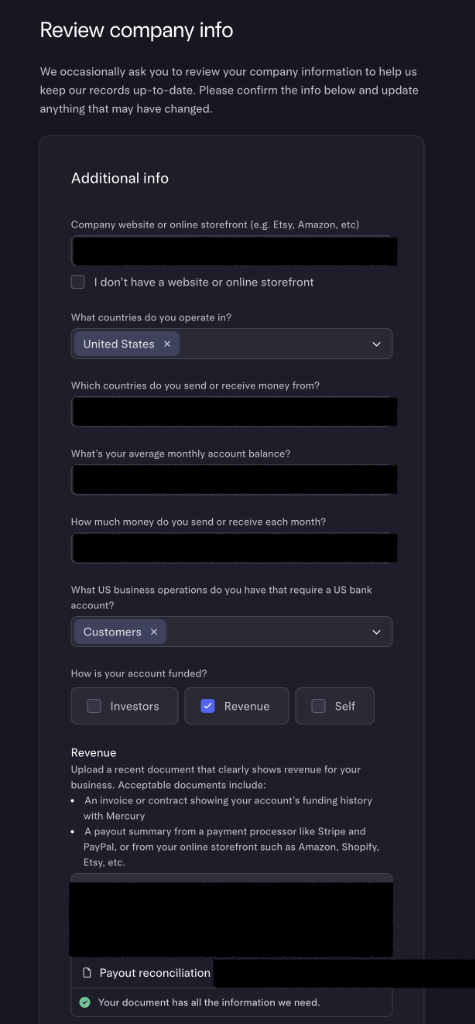
🚨 Enter your real numbers — do not inflate them
It’s tempting to type big numbers for balance and monthly volume, imagining it buys you a higher limit or looks more impressive. Do the opposite of that instinct.
Mercury already knows exactly how much money flows through your account — they hold it. When the figures you type are wildly higher or lower than your real history, the system flags you as an outlier and routes you to manual review. That means delays, requests to explain the discrepancy, and in the worst case a deeper account review. Pull your real average from the dashboard and report it honestly — Mercury serves businesses of every size, and small, accurate numbers sail through.
Easy revenue documents
A few industry questions
Depending on your industry, Mercury asks a couple more questions — customer type (B2B / B2C), how you sell (direct / indirect), and where you sell. Answer truthfully and consistently with everything else.
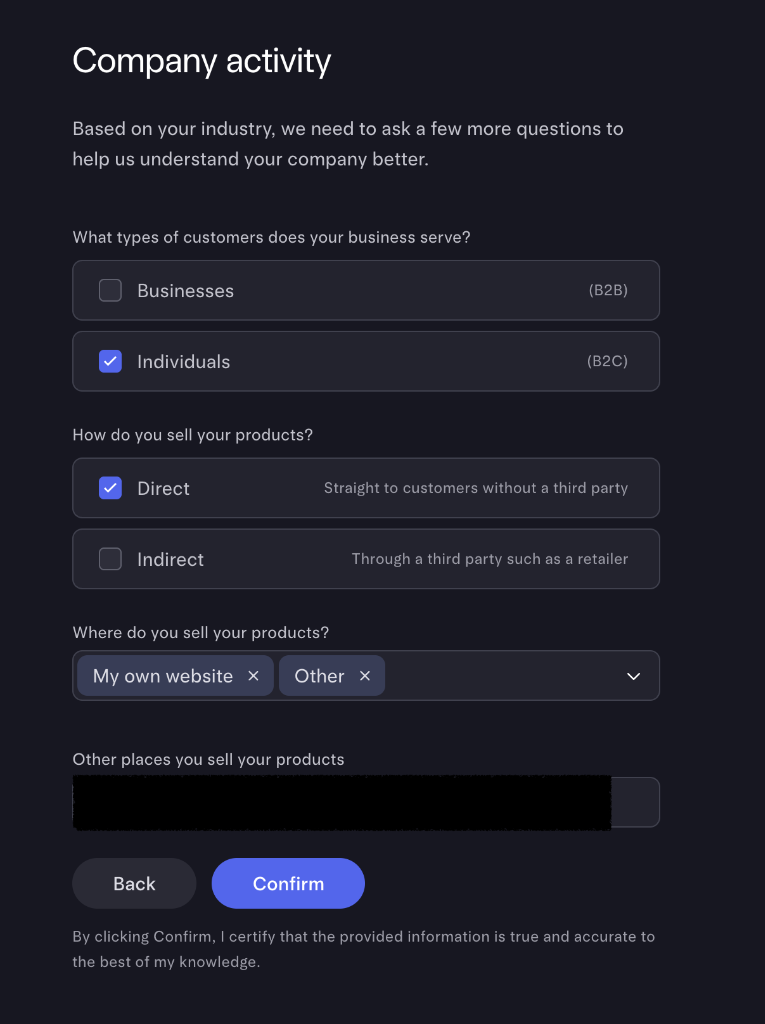
Consistency is the whole game
Done — now you wait
Finish all three sections and you’ll hit the thank-you screen. Mercury reviews your information over the next few days and emails you when it’s done — or if it needs more. Click Go to Dashboard; you’ve done your part.
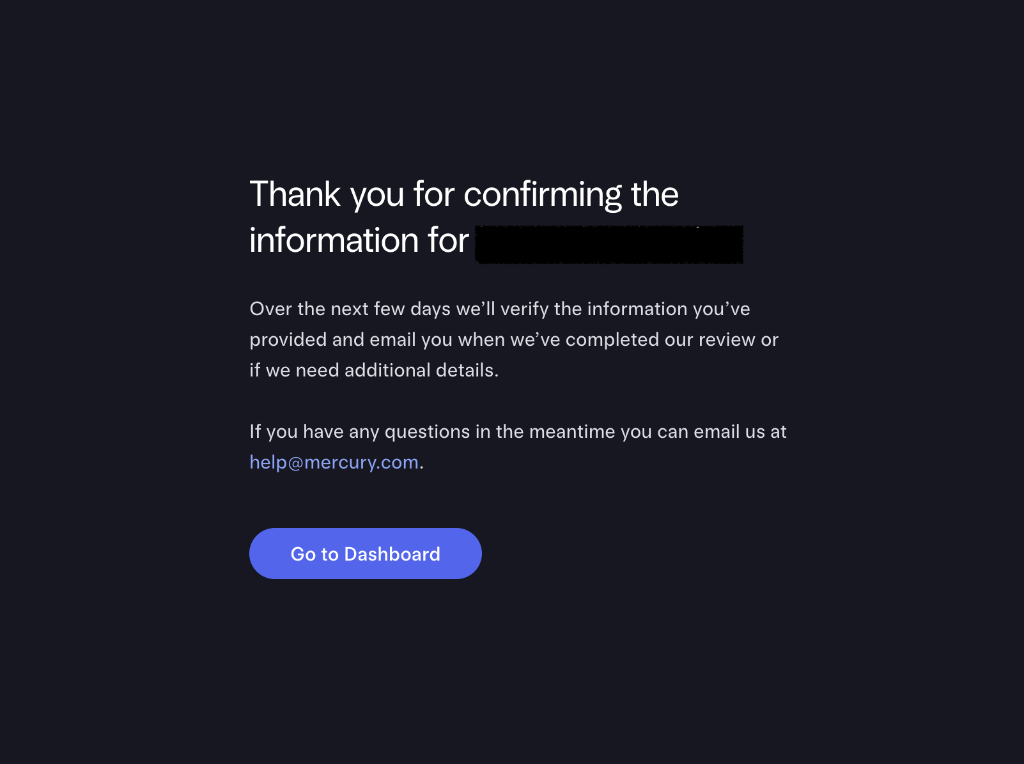
While you wait
The non-English document problem (read this before Step 9)
Here’s the trap, stated plainly. When you typed your home address into Mercury, you typed it in English— say, “No. 123, Example Road, Xinyi District, Taipei.” But the utility bill or bank statement you upload shows that address in your local language— “台北市信義區某某路123號.” Mercury’s automated checker reads English. It cannot see that those two strings are the same place, so it flags a mismatch. Nothing is actually wrong; the robot just can’t read Chinese, Japanese, Korean, Thai, Arabic, and so on.
There are three ways through, in order of preference.
Option A — Use an English-language document (best)
If you have a document that already shows your address in English, the auto-check passes and you’re done in seconds. The easiest to obtain is usually a credit-card or bank statement from an international issuer.
Documents that tend to pass instantly
- International / English credit-card or bank statement (HSBC, Citi, Standard Chartered, and many others issue English PDFs)
- For mainland-China applicants, a China Merchants Bank (招商银行) English credit-card statement is a reviewer favorite — they see the format constantly and recognize it
- A bilingual or English government ID, or an English tax-residency certificate
- A notarized English translation of your address document
Option B — Submit the non-English document anyway (it works)
No English document? Upload your local-language one regardless. The auto-check will throw the orange mismatch warning — click Confirm and proceed. Your application drops into human review instead of auto-approval, and a Mercury reviewer checks it manually, usually within 1–2 business days. The warning literally says you can do this.
Option C — If a reviewer rejects it, answer with a clean translation
Occasionally a reviewer asks for more. Mercury gives you a portal (or a chat) to upload extra documentation and explain. Make it trivially obvious that the document matches your profile:
Address verification — non-English document
My address-proof document is a [utility bill / bank statement] issued in [Traditional Chinese].
Address on document (original): 台北市信義區某某路123號5樓
Same address in English: 5F, No. 123, Example Road, Xinyi District, Taipei, Taiwan
This matches my Mercury profile exactly. The document also shows my full legal name, [pinyin] = [characters].
Please confirm the Chinese↔English correspondence in a manual review.
Make the reviewer’s job effortless
The three addresses, untangled
Half the confusion in this whole flow comes from one thing: Mercury asks for three different addresses, and they are genuinely different. Get them straight once and the rest is easy.
| Address | Where it goes | What it is |
|---|---|---|
| 🏠 Personal residential | Step 8 (ownership) | Your foreign home — where you live |
| 🏢 Company legal | Step 12 (business) | Your US address from the Articles (usually your registered agent) |
| 📬 Company physical | Step 13 (business) | Where you actually work — often a foreign address |
Part 2 — Activate Column N.A. and move your money
Submitting your info in Part 1 isn’t the finish line — it’s the handoff. Once Mercury approves your documents, it opens a new account for you (named “Welcome to Column N.A.”) and hands you an Account Transfer Tool to copy your accounts, move balances, and re-point everyone who pays you. This second half is mostly clicking Next — but a few screens decide whether your money and recurring payments land cleanly.
⏳ Part 2 has its own deadlines (check your email)
1. You’re approved — a new account appears
First comes a confirmation email: your business information passed review and a new “Welcome to Column N.A.” account has been opened. Note that your funds, cards, and settings are still on the old Choice accounts at this point — the email is just telling you the tool is ready.
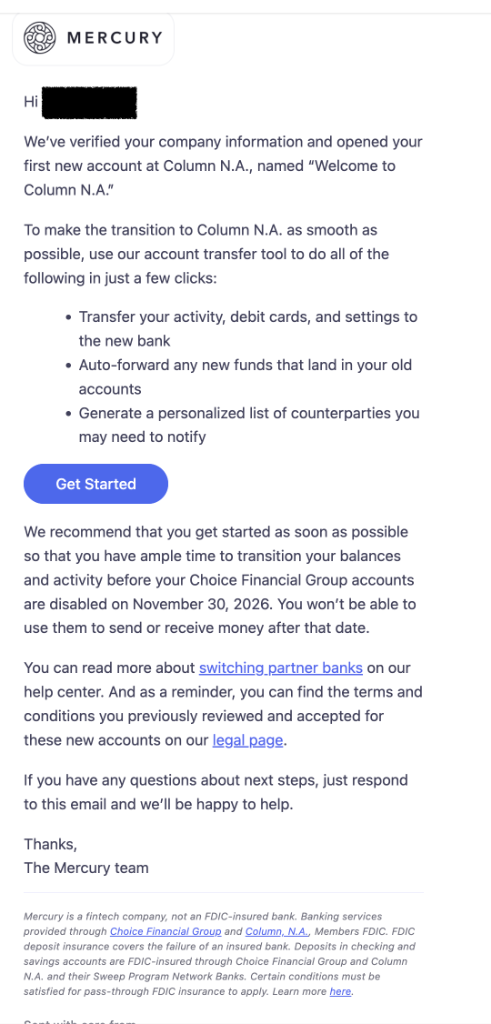
When you log in, a modal greets you: “It’s time to transition to Column N.A.”It summarizes what the transfer tool will do — copy your accounts, debit cards and settings, auto-forward incoming funds, and build a list of people to notify. Click Get started.
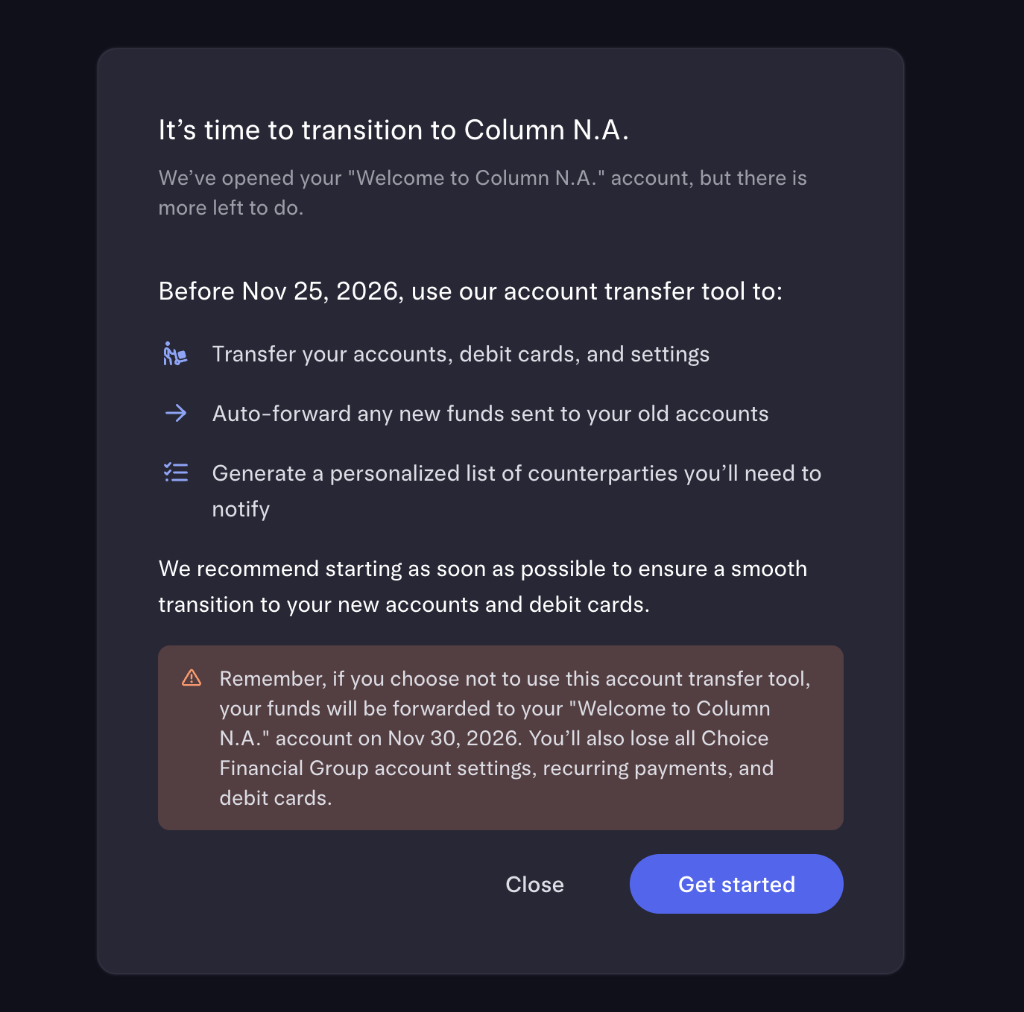
2. The transfer tool copies your accounts (with new numbers)
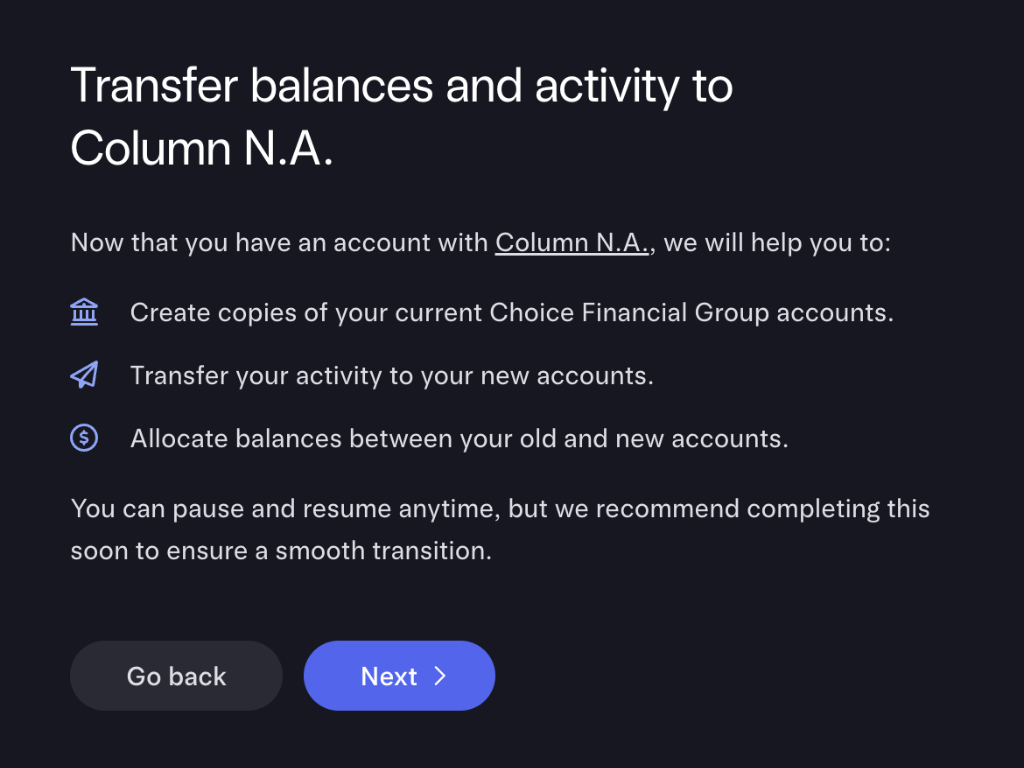
The wizard opens with an overview of its three jobs: create copies of your current accounts at Column, transfer your activity, and allocate balancesbetween old and new. You can pause and resume anytime.
Next it shows the mapping: each old account (Checking, Savings, etc.) gets a matching new account at Column with the same nicknames, auto-transfer rules, and permissions — so you don’t reconfigure anything.
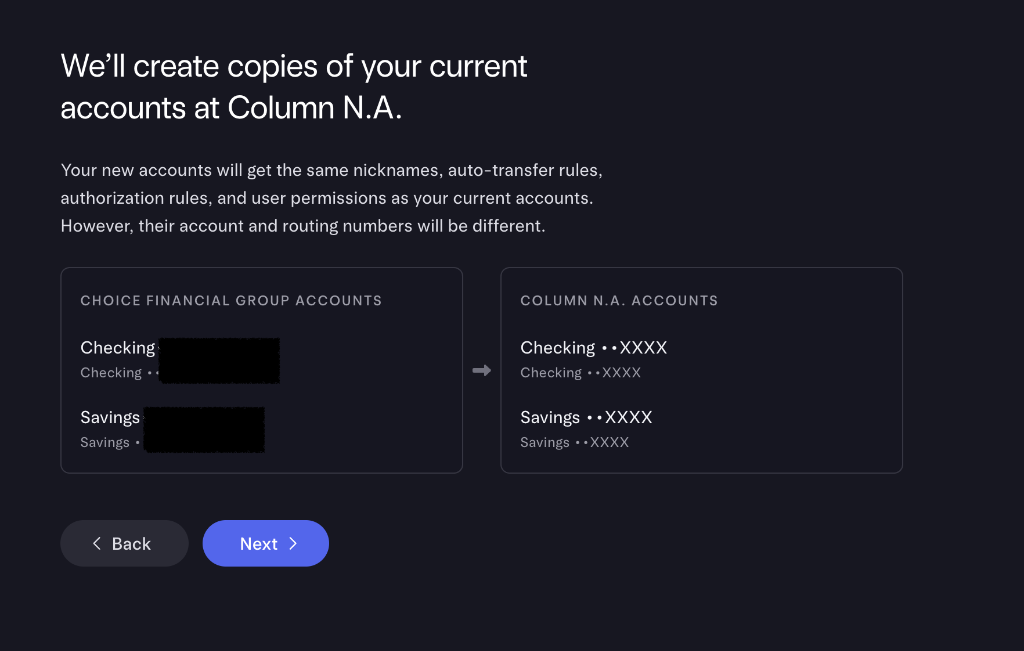
🚩 Your account and routing numbers WILL change
3. Auto-forwarding + your personalized checklist
Two screens reassure you about timing. First, incoming funds sent to your old routing and account numbers are auto-forwarded to the new accounts until the old ones are disabled — and future recurring outgoing payments (including your Mercury subscription) shift to the new accounts automatically.
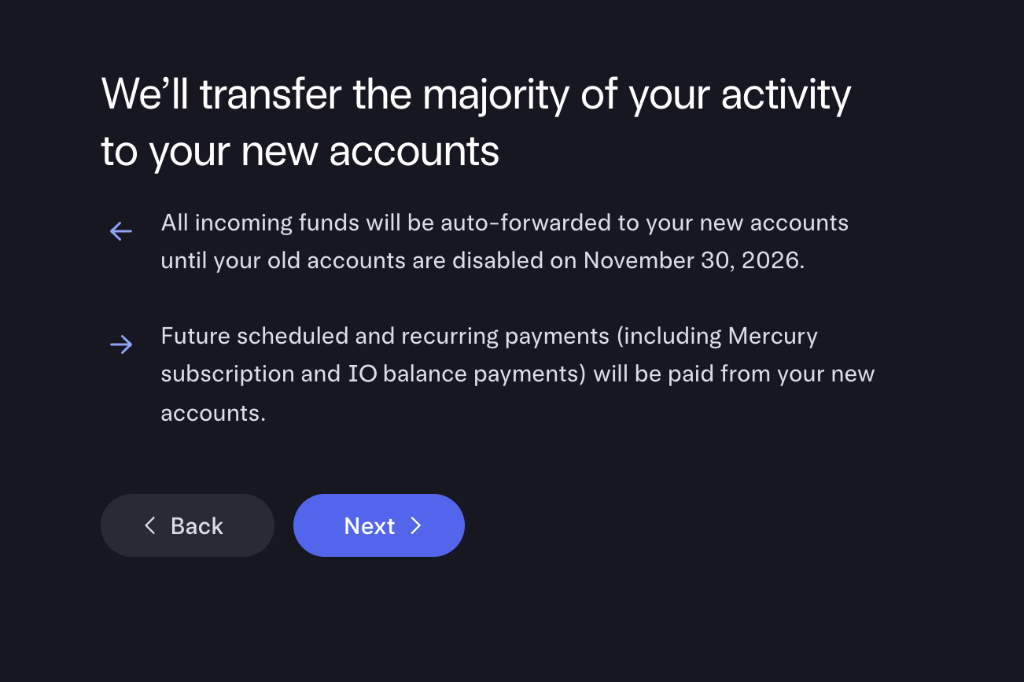
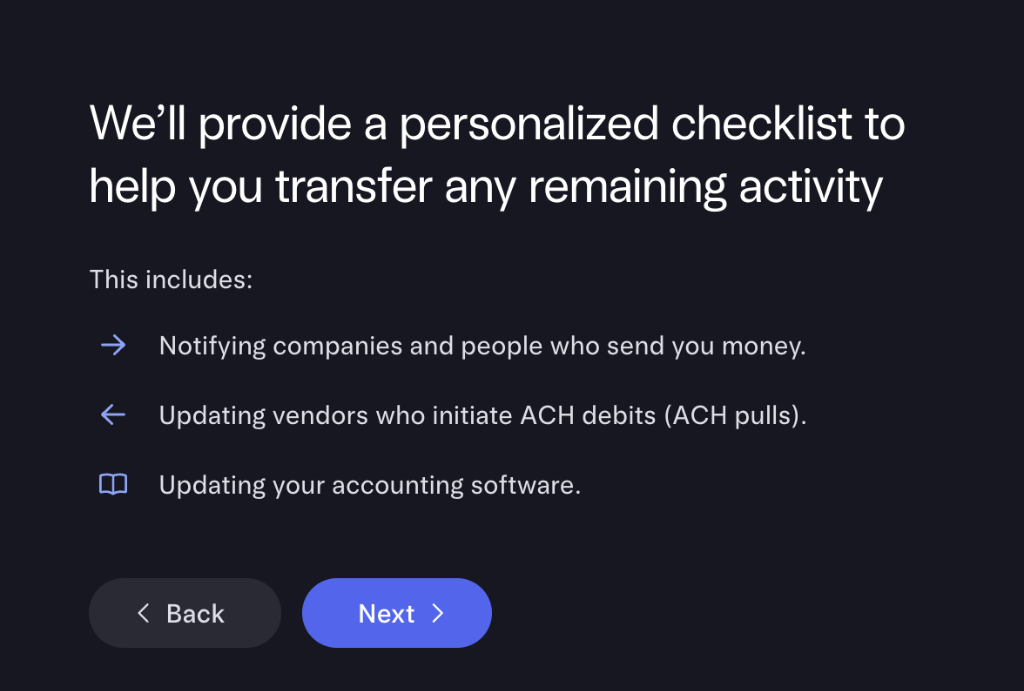
Then Mercury generates a personalized checklist of the few things it can’tdo for you — notifying people who pay you, updating vendors who pull ACH debits, and updating your accounting software.
4. Allocate balances, then start the transfer
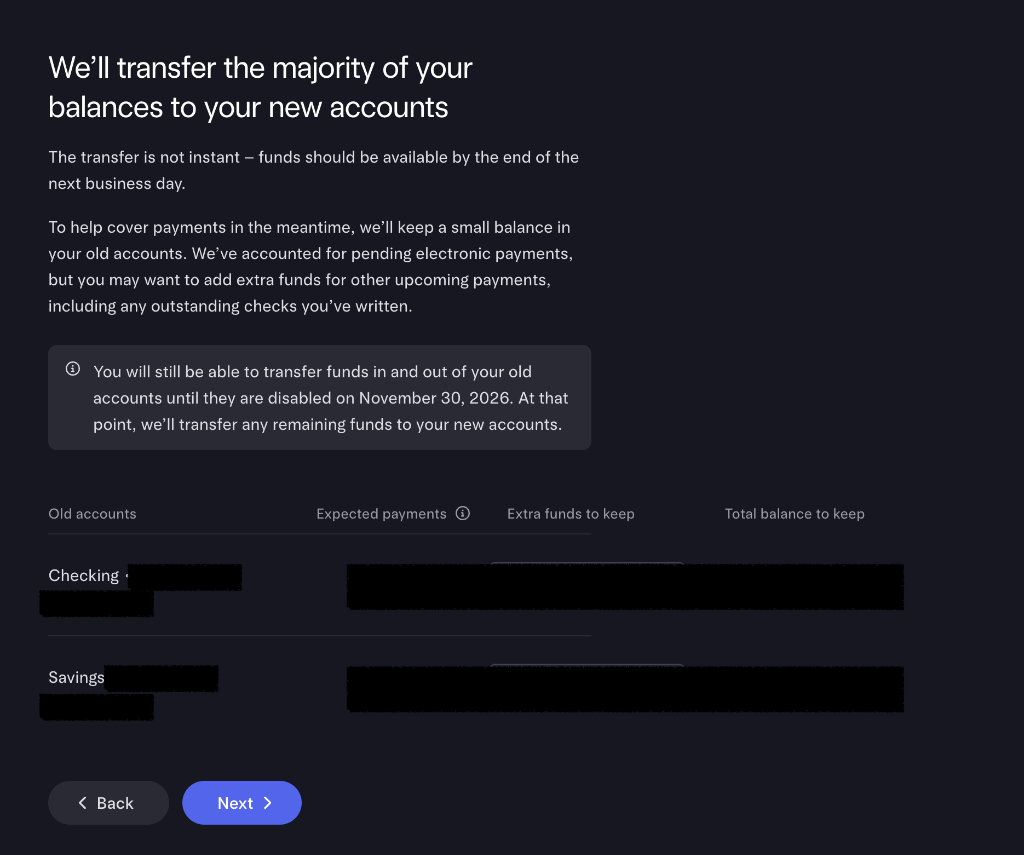
You decide how much to leave in the old accountsto cover pending charges. Mercury auto-reserves anything it can see as an “expected payment,” and you can add an extra buffer for checks or debits you know are coming. Funds typically clear in the new accounts by the end of the next business day, and you can still move money back and forth until the old accounts close.
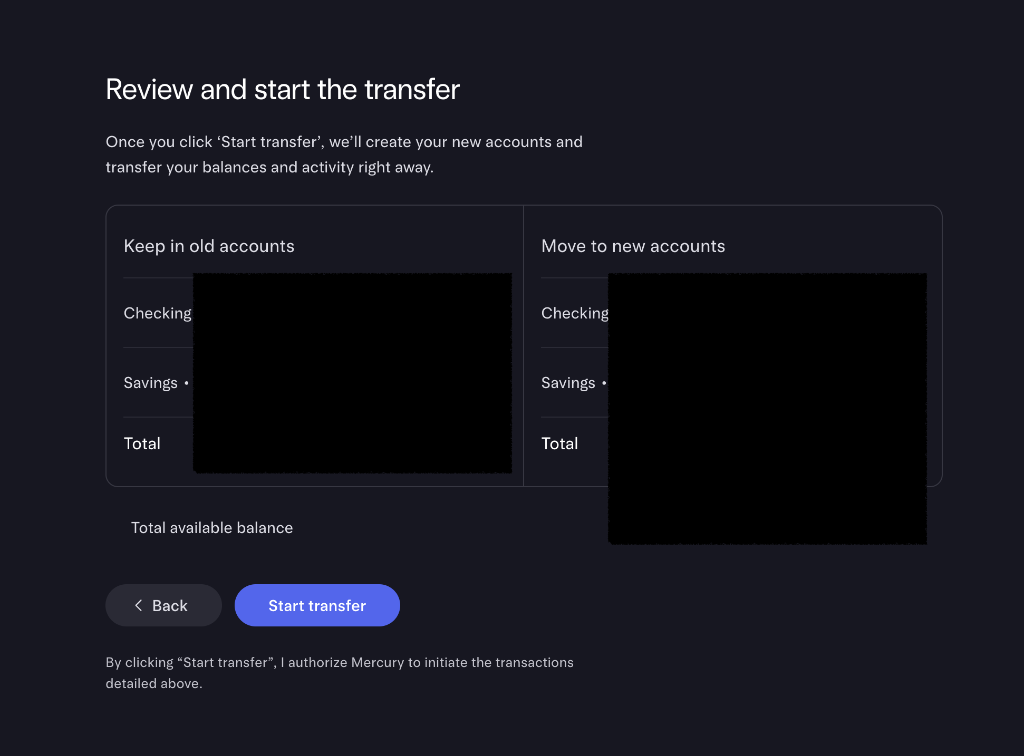
A final review screen shows Keep in old accounts vs. Move to new accounts side by side for checking and savings. Confirm the math and click Start transfer.
5. Transfer initiated — what’s done, what’s left
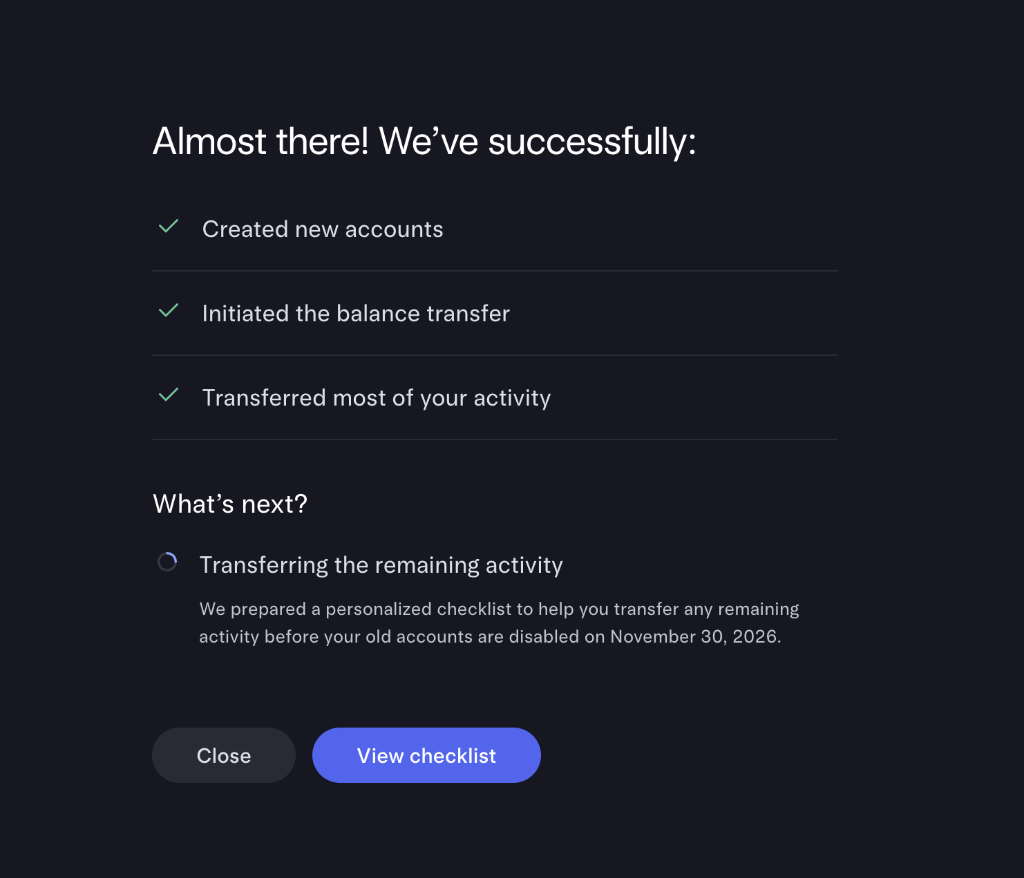
A success screen confirms the automated part: new accounts created, balance transfer initiated, activity moved. What remains are the two manual tasks from your checklist.
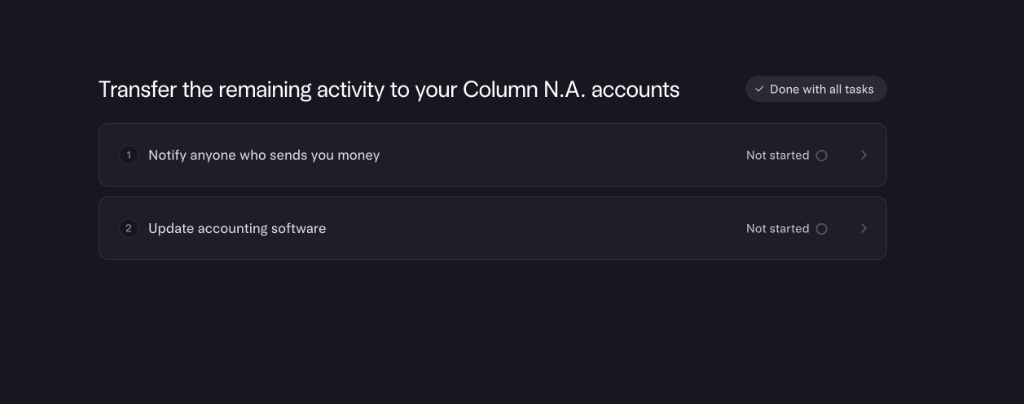
6. Share your new details with anyone who pays you
The notify tool is genuinely handy: it lists the senders Mercury detected (Stripe, clients, marketplaces) and lets you copy the new bank name and routing number, copy each sender’s specific details, send them an automated email, or download a file.
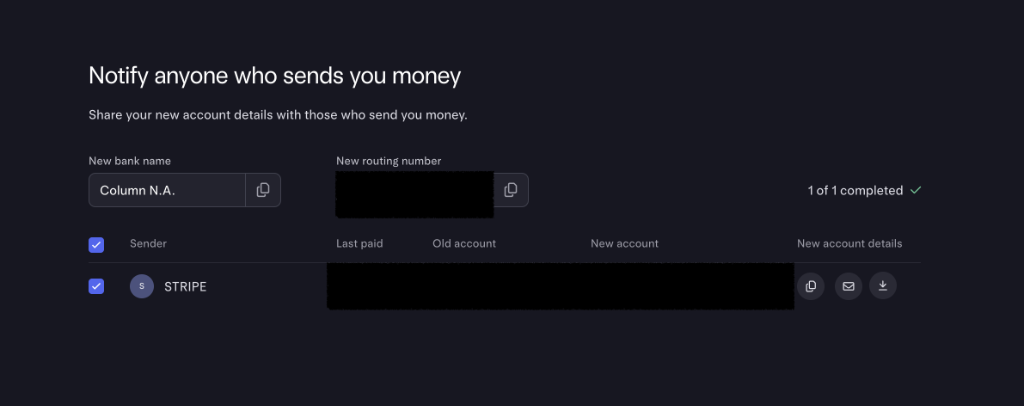
Don’t skip the people who pull from you
7. Update your accounting software and Stripe payouts
Link the new Column accounts in your bookkeeping (QuickBooks, Xero): create the new ledger accounts, connect the bank feed, copy your auto-categorization rules, and add them to your month-end reconciliation. Mercury gives you a checklist and copy-ready account numbers.
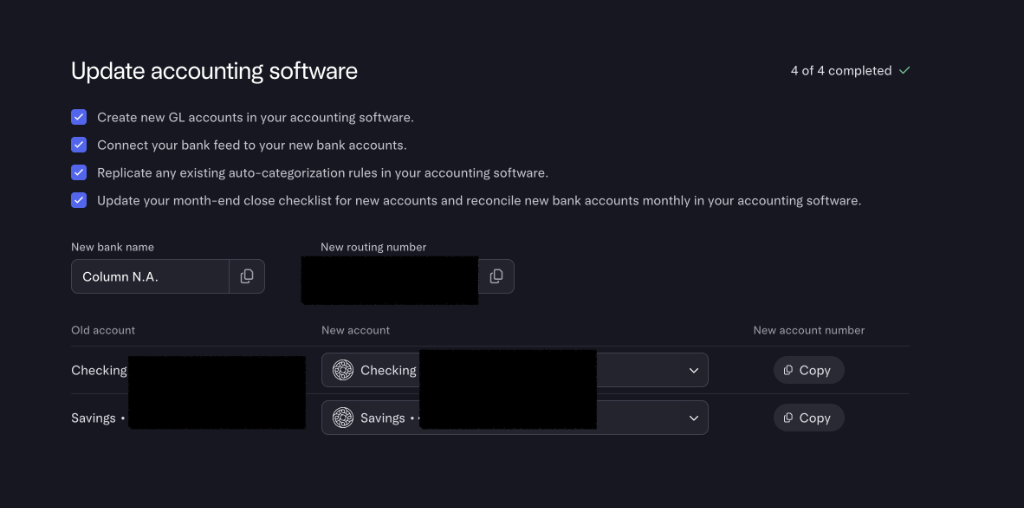
Finally — and this one bites people — go into Stripe (and any other processor that holds a payout bank account) and replace the routing and account numbers under Payout details. The account holder name must match your business name on Mercury exactly.
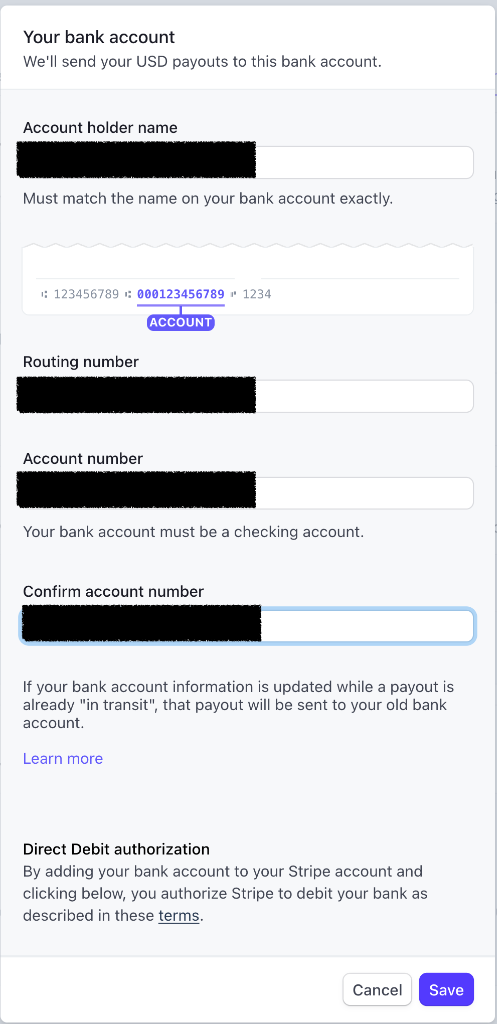
Payouts already “in transit”
Choice vs. Column: what you actually gain
A forced migration is annoying, but Mercury says Column brings genuine upgrades — and these are the ones that matter for founders receiving money from abroad.
| Feature | Choice Financial | Column N.A. |
|---|---|---|
| Incoming-wire FX rates | Standard | Mercury says: better rates |
| Real-time payments | — | Available |
| Non-USD incoming wires | Limited | Column accepts them natively |
| FDIC-insured partner bank | Yes | Yes |
| Mercury app & API | Same | Same |
FX and payment-feature claims are Mercury’s stated benefits of the move, not independently measured rates; your real costs depend on the currencies and amounts you wire. FDIC insurance is provided through Mercury’s partner banks and is subject to those banks’ program terms and the standard deposit-insurance limits and rules.
Timeline & key dates
These are the dates from the 2026 migration wave shown in this guide. Always defer to the specific dates in your own email — waves are staggered.
| When | What |
|---|---|
| You get the email | Mercury notifies affected accounts |
| Before your action deadline | Confirm business info + finish the wizard (this guide) |
| Next few days after | Mercury reviews and opens your Column accounts |
| Transition window | Old (Choice) and new (Column) accounts both open |
| Closure date | Un-migrated accounts close; funds mailed as a check — avoid this |
Migrating your bank doesn’t change what the IRS expects
Whichever partner bank holds your deposits, a foreign-owned single-member US LLC generally files Form 5472 with a pro forma Form 1120 for a year with a reportable related-party transaction — and the penalty for a required form that is missing or substantially incomplete starts at $25,000. If banking admin is on your mind, your filing probably should be too. Our guided filer walks you through it for a flat fee, no US accountant required.
Never miss an IRS deadline
Get free email reminders for Form 5472, state annual reports, quarterly estimated tax, and OBBBA rule changes — built for foreign-owned LLC owners. No spam. Unsubscribe anytime.
We respect your privacy. No spam, ever.
Keep going
- New to Mercury, or helping a friend open an account? Start with our Mercury account-opening guide, or go straight to Mercury.
- Receiving money from abroad? Compare your options in cross-border payments, or open a multi-currency account with Wise.
- Still setting up the company itself? See register a US company and best states for a foreign-owned LLC.
- Chinese founder? The China LLC-owner tax guide covers how your US profits are taxed back home.
FAQ
Will my Mercury login or app change?
No. Mercury is the fintech layer on top of the banking. Your login, password, dashboard, app, and API stay exactly the same. Only the partner bank underneath changes from Choice Financial Group to Column N.A.
Will my account and routing numbers change?
Most likely yes. Column N.A. issues new account and routing numbers. Mercury’s migration tool helps you replicate accounts and move balances, but you’ll need to update anyone who pays you by ACH and any connected services (Stripe, PayPal, payroll) with the new numbers.
What happens to my deposits during the migration?
Your deposits are held at FDIC-insured partner banks — Choice today, Column N.A. after the switch — subject to those banks’ program terms and the standard deposit-insurance limits and rules. Mercury runs both the old and new accounts in parallel during the transition, which is designed to keep your accounts accessible while you move over. To avoid disruption, follow the deadlines and notices in your own Mercury dashboard and email rather than assuming access is automatic.
I’m a non-resident — is Mercury still fine for me?
Yes. Mercury continues to support foreign-owned US companies, and Column N.A. is a nationally chartered, Member-FDIC bank that’s well-suited to incoming international wires. Just make sure your US citizenship status is set to Non-Resident.
My address document is in Chinese / Japanese / Korean — will I get rejected?
Not automatically. The auto-checker only reads English, so a local-language document triggers a mismatch warning. You can proceed anyway into a 1–2 business-day human review. Better still, upload an English-language bank or credit-card statement and the check usually passes instantly.
Can I snooze the migration?
There’s a ’Snooze for 7 days’ button, but use it sparingly. The action deadline is firm, and Mercury still needs time to review your submission and open the new account afterward. Starting early is the safe move.
Does migrating change my US tax filing?
No. Changing partner banks does not change the LLC's classification. A wholly foreign-owned disregarded LLC still tests the year for Form 5472 reportable related-party transactions, regardless of which partner bank holds the deposits.
What if I can’t finish before the deadline because I’m traveling?
Every step is online and works from anywhere. Start as soon as you can, and if you’re truly stuck, contact Mercury support (help@mercury.com) about your options before the closure date.
Sources checked
The factual claims in this guide were checked against Mercury’s and the OCC’s own published materials. These change over time — always defer to the current versions:
- Mercury — Switching Mercury partner banks — Mercury’s own walkthrough of the partner-bank migration and what to expect.
- Mercury — Column N.A. legal agreements — the Column N.A. account, sweep, and debit-card agreements you accept during the switch.
- OCC — Interpretations & Decisions index — where the OCC publishes conditional-approval decisions, including for Mercury Bank, N.A.
Independent walkthrough based on a real 2026 Mercury migration. Not affiliated with, endorsed by, or produced by Mercury Technologies Inc., Choice Financial Group, or Column N.A. Screens, wording, and dates change over time and may differ from your account — always follow the instructions in your own Mercury dashboard and email. This guide is educational and not legal, tax, or financial advice.