DHL Express to IRS: How to Fill Receiver Info (Step-by-Step)

Key Takeaways
- Pick United States of America (not US territories) as the destination country
- Save the Ogden PIN Unit address in DHL's address book — you'll file every year
- Use the dedicated PIN Unit address, NOT the standard Form 1120 mailing address
- Include 'M/S 6112' and 'Attn: PIN Unit' so internal IRS routing finds your package
- After using DHL's auto-fill, manually verify M/S 6112 wasn't expanded to 'Mail Stop 6112'
What This Screen Asks For
When you start a new DHL Express shipment online, the first major data-entry screen asks you to identify the receiver — the person or company you're shipping TO. For an IRS filing, that's the Internal Revenue Service Ogden PIN Unit.
DHL's online form is well-designed, but it assumes most users are shipping to another business contact, not a government office. Several fields don't map cleanly to an IRS mailing. This walkthrough covers the exact entries that work.
Country of Origin and Destination
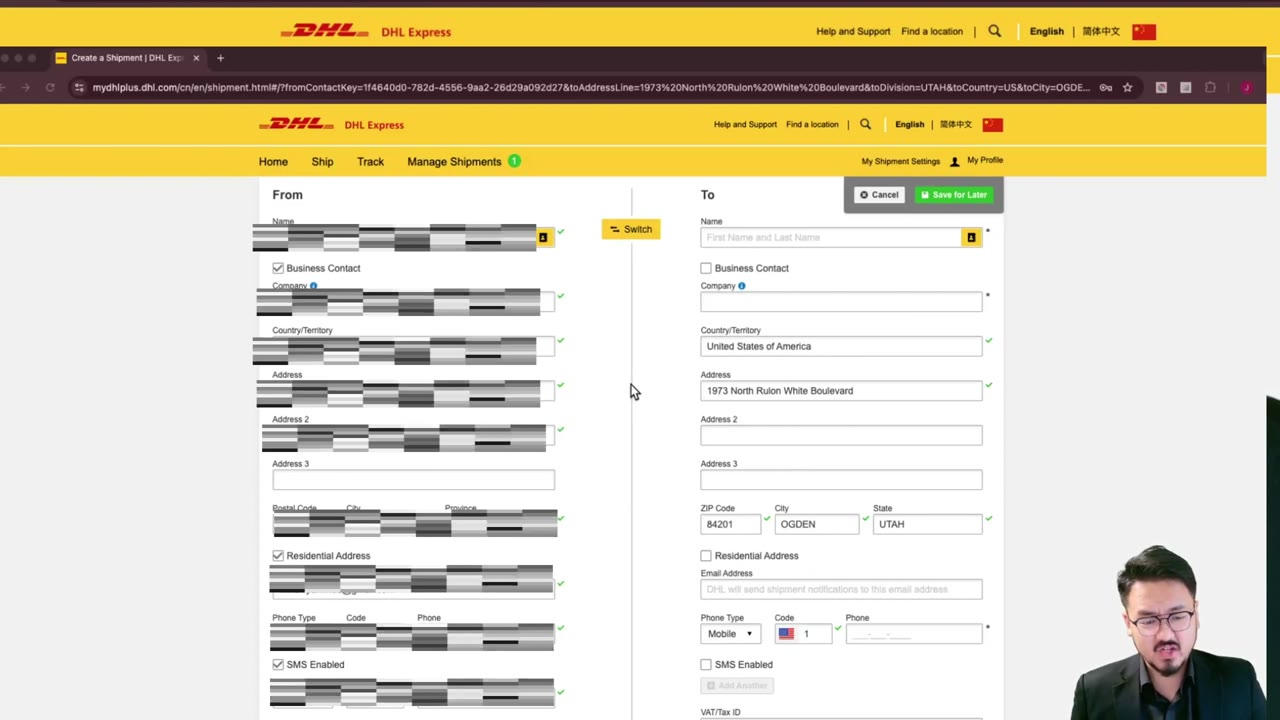
DHL first asks where you're shipping FROM (your country) and TO (United States of America). Pick these from the country dropdowns. The 'from' country drives DHL's local pickup options — make sure you choose the country where you'll physically hand the package to a DHL courier or drop it off.
For the destination, you must select 'United States of America' specifically. Don't pick 'US Virgin Islands,' 'Guam,' or 'Puerto Rico' — those route differently and won't reach Ogden, Utah.
Using the Address Book and Save Function
DHL Express lets you save addresses for repeat shipments. If you're going to file the IRS Form 5472 + pro forma 1120 every year (which you must, as long as your foreign-owned LLC exists), saving the Ogden PIN Unit address now will save you 5 minutes every year going forward.
Give the saved entry a clear name like 'IRS Ogden — Form 5472' so you can find it next year. The address auto-fills the next time you book, and you can confirm with one click.
The Receiver Address Fields (Critical)
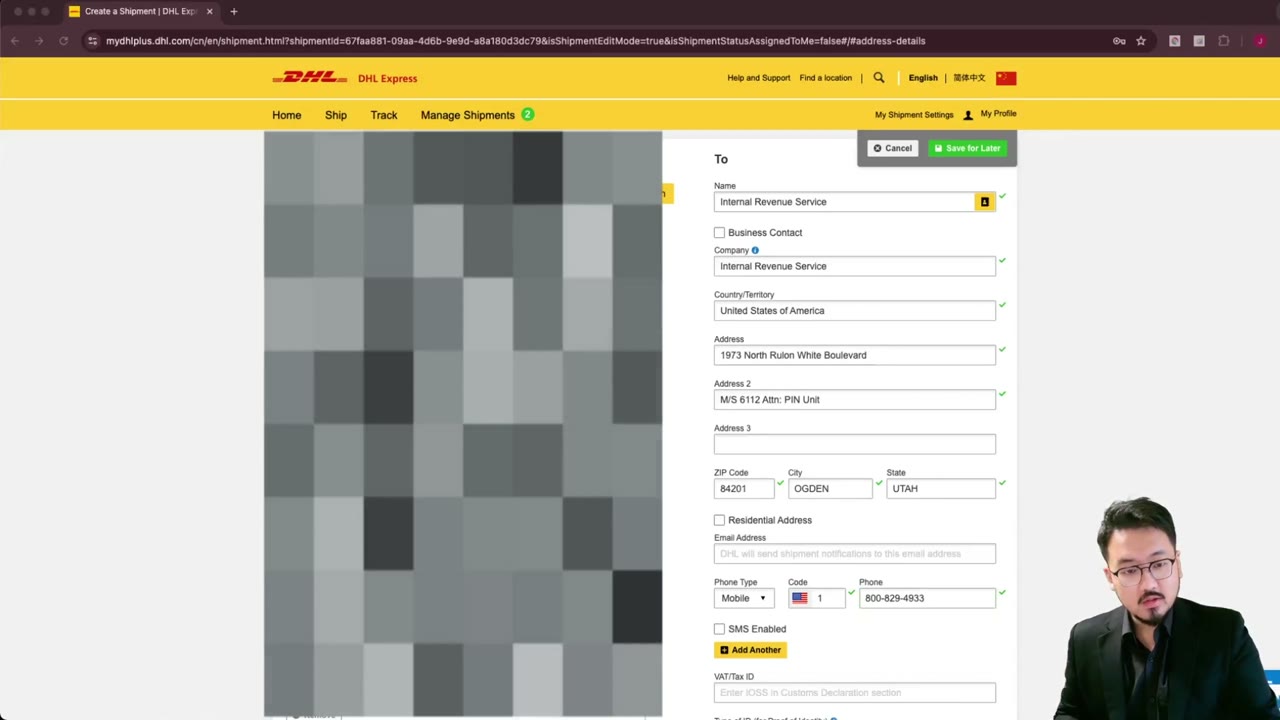
Fill the receiver fields exactly:
Company Name: Internal Revenue Service Contact Name: Leave blank, or enter 'PIN Unit' if DHL requires a name Address Line 1: 1973 Rulon White Blvd Address Line 2: M/S 6112 City: Ogden State: UT (or 'Utah' if DHL doesn't accept abbreviations) Postal Code: 84201 Country: United States of America
IMPORTANT: Don't use the regular Form 1120 mailing address from the 1120 instructions. The PIN Unit address is specific to Form 5472 + pro forma 1120 filings for foreign-owned disregarded entities. The video repeats this warning because it's the single most common mistake.
Using DHL's Address Validation Dropdown
After typing the address, DHL often shows a dropdown of suggested matches — pulled from postal service data. Selecting the dropdown match auto-fills the city/state/ZIP and confirms the address is deliverable.
DHL's database knows the IRS Ogden facility as a deliverable business address, so it should appear in the dropdown. If it doesn't, double-check your spelling of 'Rulon White Blvd' (it's a less common name) and that you entered Ogden, UT — not Ogden, NY or Ogden, IA.
In rare cases the dropdown autocorrect can change M/S 6112 to a different format. After selecting the suggestion, scroll back to Address Line 2 and verify it still says 'M/S 6112' — not 'Mail Stop 6112,' which couriers sometimes substitute and which can cause routing issues at Ogden's mailroom.
What Happens Next
Once the receiver is saved and verified, DHL moves you to the sender info screen (Step 2) — your name, address, phone, and email. After that, shipment type, dimensions, payment, and finally the booking confirmation with your tracking number.
The full sequence is 11 distinct screens. The receiver-info step (this one) is the most common point of failure because of the M/S 6112 / Attn: PIN Unit formatting quirks, so getting it right here saves time later.
Frequently Asked Questions
What should I enter as the receiver phone number?
Use 1-800-829-4933 (the IRS Business and Specialty Tax Line). DHL requires a phone for international customs forms, and the IRS won't answer for delivery questions but the line is officially associated with the agency.
Does DHL Express deliver from every country to Ogden?
DHL Express delivers from most countries to U.S. addresses, but you should verify your country has the Express service tier available — only specific service tiers (Express 9:00, 10:30, 12:00, Worldwide, Envelope) qualify for IRS §7502 timely-mailing treatment.
Should I check 'business' or 'residential' for the receiver type?
Business. The IRS Ogden facility is a federal government office, which DHL's system treats as a commercial destination.
What if DHL's dropdown doesn't recognize the IRS Ogden address?
Type the address manually and submit. DHL will still ship it — the dropdown is a convenience, not a hard requirement. After booking, watch tracking carefully and confirm delivery to 1973 Rulon White Blvd, not a generic Ogden sorting facility.
IRS Form 5472 Instructions
Official IRS source on irs.gov
Listen on Spotify
Money & Tax Talk with Rippa — 5/5 rating
Never miss an IRS deadline
Get free email reminders for Form 5472, state annual reports, quarterly estimated tax, and OBBBA rule changes — built for foreign-owned LLC owners. No spam. Unsubscribe anytime.
We respect your privacy. No spam, ever.
Need to file your foreign-owned LLC return?
Skip the CPA bill. Our guided wizard builds your IRS-ready filing package, step by step.
Includes its walkthrough video pack
Start filing →
Ask the AI tools, free
Tax Return Drafter, Catch-Up Planner, Form Reviewer, IRS Notice Decoder — purpose-built AI tools, no signup needed.
Free tier · BYOK Anthropic/OpenAI for power use
Browse tools →
Starting your foreign-owned LLC?
Vetted partners we use ourselves: doola & Firstbase for formation, Mercury for banking, Alohi for IRS faxing.
No-fluff recommendations, no Northwest
See partners →
More on Form 5472 & Foreign-Owned LLCs
 4:00
4:00DHL Express: Enter IRS Ogden Address Line-by-Line (Detail)
 3:00
3:00DHL Express to IRS: How to Fill Sender Info When Outside the U.S.
 2:30
2:30Print DHL Label & Save Tracking — Your Proof of Timely IRS Filing
 2:30
2:30DHL Express to IRS: Pick 'Documents' Shipment Type + Reference Field
 2:00
2:00Schedule DHL Express Courier Pickup for IRS Tax Return Shipment
 1:45
1:45