Faxing Form 5472: Why "In Transmission" Isn't "Sent" — Verifying Delivery

Key Takeaways
- Verify page order one more time before sending: pro forma 1120, Form 5472 pages 1-3, attachments last
- Double-check the recipient fax number digit-for-digit against IRS.gov — a wrong number is unrecoverable
- After clicking Send, wait until the status updates to "successfully sent" / "delivered" — that's the actual filing moment
- "In transmission" status is not a completed fax — don't walk away until you see the success confirmation
- Download or screenshot the transmission report; it's your proof of timely filing if questioned later
Repeat the Inside-Out Check Before You Hit Send Twice
Before you click Send a second time (because most people send and then immediately want to re-verify), step through the package mentally once more: pro forma Form 1120 first page, then Form 5472 pages 1, 2, and 3, then any attachments at the end. If anything is missing or out of order, fix it now — it's much easier to re-upload than to retract a sent fax.
This sounds excessive for a 5-page filing, but the IRS processing center genuinely expects a specific page order on multi-form submissions. A reshuffled package can trigger an information request that delays acceptance by weeks.
Double-Check the Fax Number One More Time
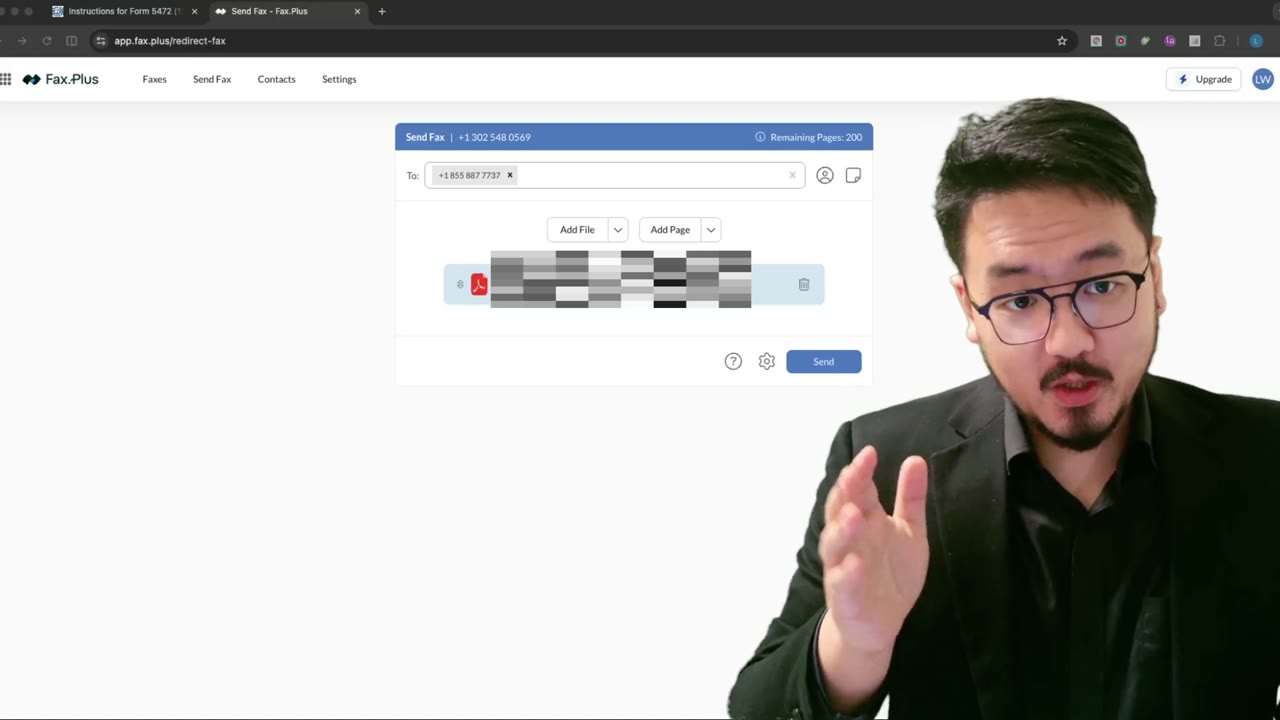
The fax.plus interface shows the recipient number you entered. Compare it digit-for-digit against the IRS official Form 5472 fax number. They should match exactly. If you copy-pasted from IRS.gov earlier and didn't touch it since, you're almost certainly fine — but the 30 seconds of verification is worth it compared to the consequences of sending the filing to the wrong number.
Once the fax leaves your service, there's no way to recall it. Whoever owns that fax number receives your filled-in Form 5472 with your EIN, your reportable transactions, and possibly identifying information about your foreign owner. Triple-checking before send is cheap; cleaning up after a misdirected fax is expensive.
Settings Should Already Be Saved
If you sent a fax through this service before, most settings (resolution, retry behavior, your sender info) are already saved from last time. Glance at them to confirm they're still what you want — 300+ DPI, retry-on-busy enabled, no cover sheet (the IRS doesn't want one) — and move on.
Send and Then Wait for the Status to Settle
Click Send. The fax queues, then the status changes to something like "sending" or "in transmission." Wait. Don't close the tab, don't move on yet — watch the status update.
A fax in transmission is not yet sent. It might be queued behind other faxes, or the IRS line might be busy and the service is retrying. The transmission can take anywhere from 30 seconds to several minutes depending on the size of the package and the IRS line load that day.
Only "Successfully Sent" Counts as Done
Refresh until the status changes from "in transmission" to "successfully sent" (or whatever the service's success label is — fax.plus uses a green checkmark and "Delivered"). Until you see that confirmation, the filing is not complete. Treating it as complete and walking away is a common mistake, because users assume that clicking Send is the action — it isn't. The action is delivery confirmation.
Once you have that confirmation, you can rest. Download or screenshot the transmission report (it has a timestamp and recipient number) and save it with your tax records. If the IRS later questions whether you filed on time, that report is your proof of timely filing — it counts as the filing date for a faxed return.
What to Do If It Stays in Transmission
If the status sits at "in transmission" for more than 10 minutes, something is wrong. Most likely the IRS line is overloaded (common around quarterly deadlines) and the service is retrying. Wait another 10–15 minutes — most retries succeed.
If after 30 minutes it's still not delivered, cancel the fax (most services let you cancel an in-flight transmission) and try again. Faxing the same package twice when both eventually deliver isn't a problem at the IRS end — the second copy gets logged as a duplicate and discarded — but you don't want to bill yourself twice for the page count.
Frequently Asked Questions
When does the IRS treat my filing as received — when I click Send or when the fax delivers?
The delivery moment. The IRS considers a faxed return filed on the date and time the fax was successfully transmitted to their receiving fax. Your service's transmission report is the evidence — keep it.
What if my fax is still in transmission after 30 minutes?
Cancel and retry. The IRS fax line is overloaded around deadlines (especially mid-April), and a fax stuck in transmission usually means the retry queue isn't getting through. A fresh send often succeeds.
Do I need to send a cover sheet?
No. The IRS doesn't want a cover sheet for Form 5472 faxes — just the form package itself. Including one wastes a page and confuses the processing center.
IRS Form 5472 Instructions
Official IRS source on irs.gov
Listen on Spotify
Money & Tax Talk with Rippa — 5/5 rating
Never miss an IRS deadline
Get free email reminders for Form 5472, state annual reports, quarterly estimated tax, and OBBBA rule changes — built for foreign-owned LLC owners. No spam. Unsubscribe anytime.
We respect your privacy. No spam, ever.
Need to file your foreign-owned LLC return?
Skip the CPA bill. Our guided wizard builds your IRS-ready filing package, step by step.
Includes its walkthrough video pack
Start filing →
Ask the AI tools, free
Tax Return Drafter, Catch-Up Planner, Form Reviewer, IRS Notice Decoder — purpose-built AI tools, no signup needed.
Free tier · BYOK Anthropic/OpenAI for power use
Browse tools →
Starting your foreign-owned LLC?
Vetted partners we use ourselves: doola & Firstbase for formation, Mercury for banking, Alohi for IRS faxing.
No-fluff recommendations, no Northwest
See partners →
More on Form 5472 & Foreign-Owned LLCs
Foreign-Owned LLC IRS Mail Submission — 5-Point Pre-Mail Checklist
Foreign-Owned LLC IRS Mail Checklist: 5 Steps Before You Send Form 5472
 5:45
5:45Faxing Form 5472: Which Send-Dialog Settings to Enable (and Why HD Is a Trap)
 3:28
3:28Faxing Form 5472 to the IRS: Fixing the XFA/XML PDF Merge Error
 2:24
2:24Faxing Form 5472: Sending the Combined PDF via a Web Fax Service (fax.plus)
 2:15
2:15Mailing Form 5472: Why a Tracking Number Isn't Proof (and What to Download Instead)
 2:00
2:00